> ## Documentation Index
> Fetch the complete documentation index at: https://docs.alex.com/llms.txt
> Use this file to discover all available pages before exploring further.
# Triggers and Actions
> Reference for all available triggers, actions, and utilities in the workflow builder
The workflow builder provides three categories of components you can use to build your blocks: **Triggers**, **Actions**, and **Utilities**. This page is a reference for all available options.
Some triggers and actions are **ATS-specific** -- they are only available when you have a particular ATS connected, and will display the ATS logo on them. Others are global and available to everyone.
## Triggers
Triggers are events that start a block. Every block must begin with exactly one trigger.
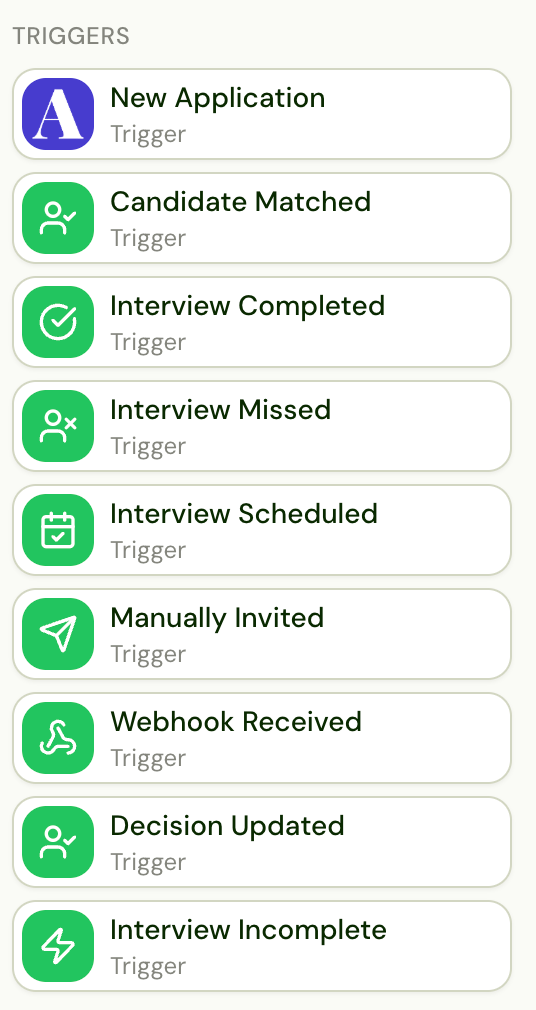 ### Application Workflow Triggers
| Trigger | Description |
| ------------------------ | ------------------------------------------------------------------- |
| **New Application** | A new candidate applies or is submitted to a job |
| **Candidate Matched** | Alex matches a candidate to a job via Search and Match |
| **Interview Completed** | A candidate finishes an interview |
| **Interview Missed** | A candidate misses a scheduled interview |
| **Interview Scheduled** | A candidate schedules an interview |
| **Manually Invited** | A candidate is manually invited from the Alex dashboard |
| **Webhook Received** | An external webhook is received |
| **Decision Updated** | A candidate's decision status changes (shortlisted, rejected, etc.) |
| **Interview Incomplete** | A candidate starts but does not complete an interview |
### Job Workflow Triggers
| Trigger | Description |
| -------------------- | --------------------------------- |
| **New Job from ATS** | A new job is detected in your ATS |
Depending on your ATS, you may also have ATS-specific triggers (e.g., candidate moved to a specific stage in Greenhouse, new submission in Bullhorn). These will appear automatically when your ATS is connected.
## Actions
Actions are the steps Alex takes after a trigger fires. They run sequentially from top to bottom.
### Application Workflow Triggers
| Trigger | Description |
| ------------------------ | ------------------------------------------------------------------- |
| **New Application** | A new candidate applies or is submitted to a job |
| **Candidate Matched** | Alex matches a candidate to a job via Search and Match |
| **Interview Completed** | A candidate finishes an interview |
| **Interview Missed** | A candidate misses a scheduled interview |
| **Interview Scheduled** | A candidate schedules an interview |
| **Manually Invited** | A candidate is manually invited from the Alex dashboard |
| **Webhook Received** | An external webhook is received |
| **Decision Updated** | A candidate's decision status changes (shortlisted, rejected, etc.) |
| **Interview Incomplete** | A candidate starts but does not complete an interview |
### Job Workflow Triggers
| Trigger | Description |
| -------------------- | --------------------------------- |
| **New Job from ATS** | A new job is detected in your ATS |
Depending on your ATS, you may also have ATS-specific triggers (e.g., candidate moved to a specific stage in Greenhouse, new submission in Bullhorn). These will appear automatically when your ATS is connected.
## Actions
Actions are the steps Alex takes after a trigger fires. They run sequentially from top to bottom.
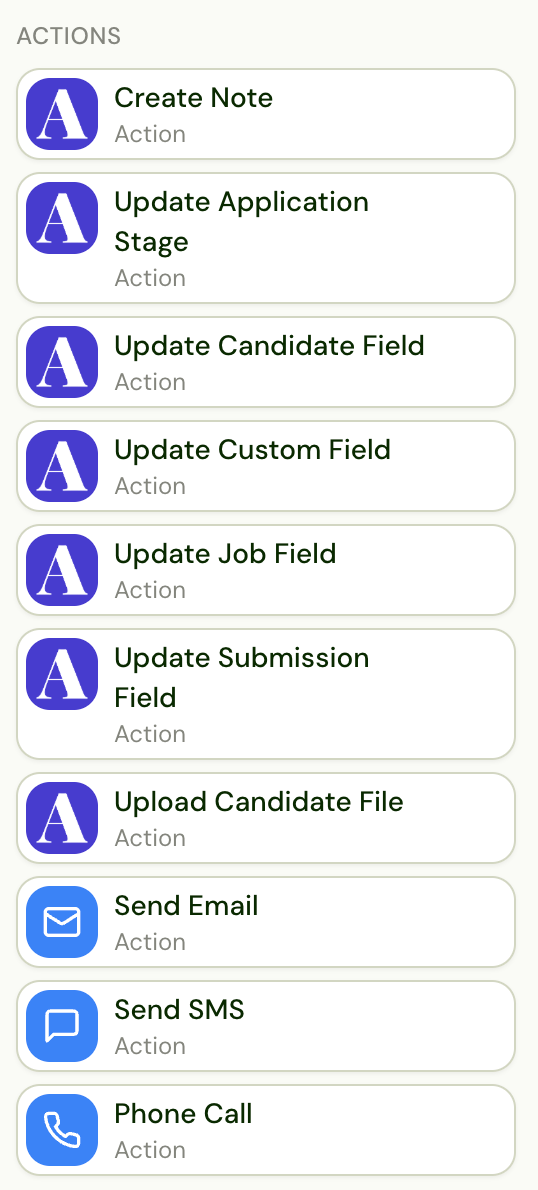 ### Communication Actions
| Action | Description |
| -------------- | -------------------------------------------------------------- |
| **Send Email** | Send an email to the candidate, recruiter, or other recipients |
| **Send SMS** | Send a text message to the candidate |
| **Phone Call** | Have Alex call the candidate |
### ATS Sync Actions
These actions write data back to your ATS. The specific fields and options available depend on your ATS integration.
| Action | Description |
| ---------------------------- | --------------------------------------------------------------- |
| **Create Note** | Add a note to the candidate's profile in the ATS |
| **Update Application Stage** | Move the candidate to a different stage/status in the ATS |
| **Update Candidate Field** | Update a field on the candidate entity in the ATS |
| **Update Custom Field** | Update a custom field in the ATS |
| **Update Job Field** | Update a field on the job entity in the ATS |
| **Update Submission Field** | Update a field on the submission entity in the ATS |
| **Upload Candidate File** | Attach a file (e.g., PDF report) to the candidate's ATS profile |
### Job Workflow Actions
| Action | Description |
| ----------------- | -------------------------------------------------------------------------------------------------- |
| **Configure Job** | Set up a job in Alex with rounds, interview guides, and settings. Only available in job workflows. |
| **API Request** | Send a request to an external API. Available in job workflows. |
## Utilities
Utilities are special actions that control the flow of your workflow -- adding conditional logic, delays, and round progression.
### Flow Control
| Utility | Description |
| --------------------- | ----------------------------------------------------------------------------------------------------------------------------------------------------------------------------------------------------------------------------------------------------------------------------------------------------------------------------------------------------------------------- |
| **Initiate Outreach** | A group container that holds the outreach steps (emails, SMS, calls, waits) for a round. On an **AI interview** round it invites the candidate to the interview; on a **human** round it sends a scheduling link to hand the candidate off to a recruiter or hiring manager (requires the Coordinator add-on). Any invite/scheduling email must live inside this group. |
| **Move to Round** | Move the candidate to another round in the interview process. |
| **Wait** | Pause for a specified amount of time before continuing to the next action. |
### Conditional Logic
| Utility | Description |
| -------------------------------- | --------------------------------------------------------------------------------------------------------------------------------------------------------------------------------------------------------------------------------------------------------------------------------------------------------------------------------------------------------------------------------------------------- |
| **Is** | Branch based on conditions using Alex's native fields (score, name, location, etc.). Creates Yes/No paths. |
| **Filter By Candidate** | Query your ATS to check conditions against the candidate entity. Creates Yes/No paths. |
| **Filter By Job** | Query your ATS to check conditions against the job entity. Creates Yes/No paths. |
| **Filter By Application** | Query your ATS to check conditions against the application/submission entity. Creates Yes/No paths. |
| **Filter By Application (Alex)** | Check the application's own Alex record — its decision, applied date, withdrawn state, and every Alex session on that application (status, recency, decision). Unlike Filter By Candidate, its Sessions array is scoped to the one application, making it the way to gate Decision Updated branches on whether the application was ever interviewed (e.g. Sessions is empty). Creates Yes/No paths. |
### Initiate Outreach Groups
The **Initiate Outreach** group is a container that wraps a round's outreach sequence -- the emails, SMS, calls, and waits Alex runs to reach the candidate. Place any ATS updates, notifications, conditions, or **Move to Round** steps *before* the Initiate Outreach group; the outreach steps live *inside* it.
The group's behavior follows the round type:
* **AI interview round** -- the outreach invites the candidate to the AI interview.
* **Human round** -- the outreach sends a scheduling link and hands the candidate off to the assigned recruiter or hiring manager. Requires the Coordinator add-on -- see [Coordinator](/workflows/coordinator).
## ATS-Specific Components
Some triggers and actions are only available with certain ATS integrations. You'll recognize them by the ATS logo displayed on the component. These provide deeper integration with your specific ATS, such as:
* ATS-specific triggers (e.g., candidate moved to a specific stage)
* ATS-specific field updates
* ATS-specific file upload options
The available ATS-specific components will appear automatically in the sidebar when your ATS is connected.
## Custom Actions
If you need a trigger or action that isn't currently available, reach out to our customer success team. We can look into adding custom actions tailored to your use case, which you can then use in your workflows like any other action.
### Communication Actions
| Action | Description |
| -------------- | -------------------------------------------------------------- |
| **Send Email** | Send an email to the candidate, recruiter, or other recipients |
| **Send SMS** | Send a text message to the candidate |
| **Phone Call** | Have Alex call the candidate |
### ATS Sync Actions
These actions write data back to your ATS. The specific fields and options available depend on your ATS integration.
| Action | Description |
| ---------------------------- | --------------------------------------------------------------- |
| **Create Note** | Add a note to the candidate's profile in the ATS |
| **Update Application Stage** | Move the candidate to a different stage/status in the ATS |
| **Update Candidate Field** | Update a field on the candidate entity in the ATS |
| **Update Custom Field** | Update a custom field in the ATS |
| **Update Job Field** | Update a field on the job entity in the ATS |
| **Update Submission Field** | Update a field on the submission entity in the ATS |
| **Upload Candidate File** | Attach a file (e.g., PDF report) to the candidate's ATS profile |
### Job Workflow Actions
| Action | Description |
| ----------------- | -------------------------------------------------------------------------------------------------- |
| **Configure Job** | Set up a job in Alex with rounds, interview guides, and settings. Only available in job workflows. |
| **API Request** | Send a request to an external API. Available in job workflows. |
## Utilities
Utilities are special actions that control the flow of your workflow -- adding conditional logic, delays, and round progression.
### Flow Control
| Utility | Description |
| --------------------- | ----------------------------------------------------------------------------------------------------------------------------------------------------------------------------------------------------------------------------------------------------------------------------------------------------------------------------------------------------------------------- |
| **Initiate Outreach** | A group container that holds the outreach steps (emails, SMS, calls, waits) for a round. On an **AI interview** round it invites the candidate to the interview; on a **human** round it sends a scheduling link to hand the candidate off to a recruiter or hiring manager (requires the Coordinator add-on). Any invite/scheduling email must live inside this group. |
| **Move to Round** | Move the candidate to another round in the interview process. |
| **Wait** | Pause for a specified amount of time before continuing to the next action. |
### Conditional Logic
| Utility | Description |
| -------------------------------- | --------------------------------------------------------------------------------------------------------------------------------------------------------------------------------------------------------------------------------------------------------------------------------------------------------------------------------------------------------------------------------------------------- |
| **Is** | Branch based on conditions using Alex's native fields (score, name, location, etc.). Creates Yes/No paths. |
| **Filter By Candidate** | Query your ATS to check conditions against the candidate entity. Creates Yes/No paths. |
| **Filter By Job** | Query your ATS to check conditions against the job entity. Creates Yes/No paths. |
| **Filter By Application** | Query your ATS to check conditions against the application/submission entity. Creates Yes/No paths. |
| **Filter By Application (Alex)** | Check the application's own Alex record — its decision, applied date, withdrawn state, and every Alex session on that application (status, recency, decision). Unlike Filter By Candidate, its Sessions array is scoped to the one application, making it the way to gate Decision Updated branches on whether the application was ever interviewed (e.g. Sessions is empty). Creates Yes/No paths. |
### Initiate Outreach Groups
The **Initiate Outreach** group is a container that wraps a round's outreach sequence -- the emails, SMS, calls, and waits Alex runs to reach the candidate. Place any ATS updates, notifications, conditions, or **Move to Round** steps *before* the Initiate Outreach group; the outreach steps live *inside* it.
The group's behavior follows the round type:
* **AI interview round** -- the outreach invites the candidate to the AI interview.
* **Human round** -- the outreach sends a scheduling link and hands the candidate off to the assigned recruiter or hiring manager. Requires the Coordinator add-on -- see [Coordinator](/workflows/coordinator).
## ATS-Specific Components
Some triggers and actions are only available with certain ATS integrations. You'll recognize them by the ATS logo displayed on the component. These provide deeper integration with your specific ATS, such as:
* ATS-specific triggers (e.g., candidate moved to a specific stage)
* ATS-specific field updates
* ATS-specific file upload options
The available ATS-specific components will appear automatically in the sidebar when your ATS is connected.
## Custom Actions
If you need a trigger or action that isn't currently available, reach out to our customer success team. We can look into adding custom actions tailored to your use case, which you can then use in your workflows like any other action.