

What you unlock
- Identify fraudulent candidates early, which is especially valuable for remote and high-volume hiring
- Coverage across email, phone, IP and location, LinkedIn, and digital footprint signals
- A clear overall risk level and a consolidated report that’s easy to share internally
When verification runs
1
When the candidate is invited
Alex checks the candidate’s email address, phone number, and digital footprint. No interview data is needed, so results are available before the candidate starts.
2
When the interview is completed
Alex adds the IP address the candidate connected from, along with their LinkedIn profile and resume when available, and recalculates the risk level. It also reads the interview transcript to check whether the candidate confirmed they can work at a specific office location while connecting from a different country or state.
When a category can’t run, for example because the candidate has no LinkedIn URL or interviewed by phone, it is left out of the panel and the score is calculated from the remaining categories. It doesn’t count against the candidate.
Reading the panel
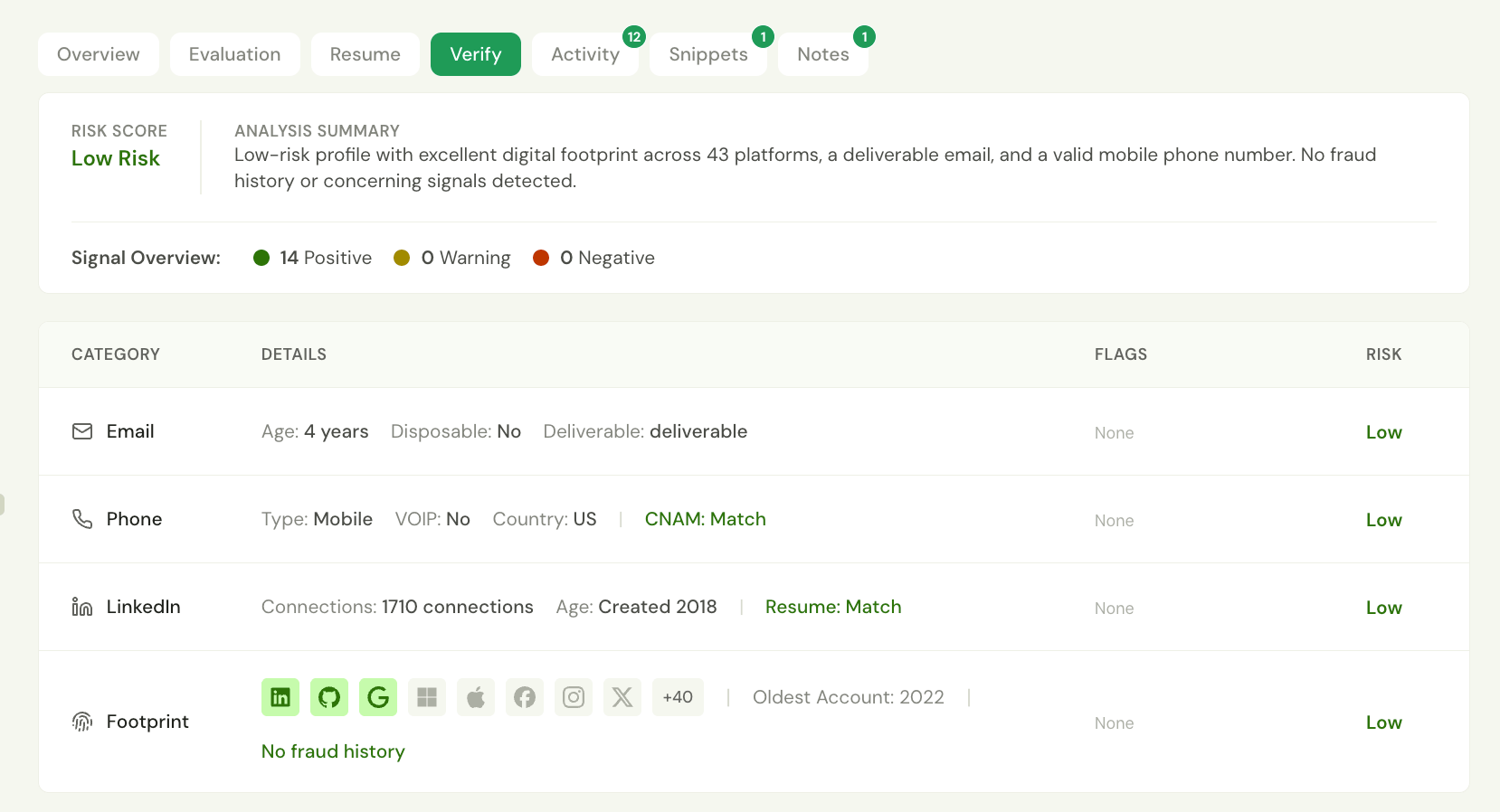
How the risk level is calculated
Risk levels
The overall risk level comes from a single verification score from 0 to 100, where higher is safer:Step 1: Category scores
Each category gets its own 0–100 score (higher is safer). How each one is scored is explained in the data dictionary below. The category scores are then combined using these weights:
Only the categories that ran are included, and their weights are rescaled so they add up to 100%. For example, a candidate with only Email, Phone, and Footprint results gets 30% Email, 30% Phone, and 40% Footprint.
Step 2: Deductions
Some findings are too serious to be diluted by an average. They are deducted from the combined score:
The deductions in the first five rows are capped at a combined −50. The resume deduction applies on top of that.
Step 3: Overrides
A VoIP number registered in a different country from the candidate’s IP location always produces a High risk level. The score is capped at 40, whatever the other results are.Worked example
A candidate’s email scores 85, phone scores 100 (mobile number), and footprint scores 95 (17 accounts). They interviewed by phone, so there is no Location result, and they have no LinkedIn URL. Their email has 24 fraudulent transactions in the fraud network.- Weighted average across Email (30%), Phone (30%), and Footprint (40%): 25.5 + 30 + 38 = 93.5
- Deduction for 16 or more fraudulent transactions: 93.5 − 40 = 53.5
- Rounded score 54, which is Medium risk.
Data dictionary
Flags appear in the Flags column under the names shown below. Negative flags are red and Warning flags are amber. Positive signals don’t appear as flags, but they are counted in the Signal Overview and can be mentioned in the Analysis Summary.
Category score: starts at 70. A disposable address scores 5 and an undeliverable one scores 15, with no other adjustments. Otherwise: +15 if confirmed deliverable, +5 for a valid format, +10 for a non-free (for example, company) email domain, +10 if the address is 2 years or older, and −10 if it is under 1 year old.
Flags
Phone
Details
Category score: 100 for a valid mobile or landline number, 80 for a VoIP number, and 0 for an invalid number.
Flags
Location
Details
Category score: starts at 100. −40 for Tor, −30 for a VPN, −25 for a web or public proxy, −20 for a datacenter IP, and −15 for a residential proxy.
Flags
Category score: the profile starts at 100. −30 if the profile is less than 1 year old, −20 for fewer than 50 connections (−10 for 50–99), −25 if the connection count is hidden, −10 with no headline, −15 with no work experience, and −5 with no education. +5 for a Premium account and +10 for received recommendations. When a resume is available, the LinkedIn score is 40% profile score plus 60% resume match score. If the LinkedIn work history isn’t publicly visible, the resume match counts as 50.
Flags
Footprint
The digital footprint shows how established the candidate’s email address is across the internet, and whether it has a history of fraud in the network. DetailsWhat “fraudulent transactions” means. The fraud network is shared by thousands of businesses, including online retailers, payment providers, banks, and marketplaces. When one of them declines a transaction, sign-up, or application involving an email address and marks it as fraud, that decline is recorded against the address. The number in the Fraud History tooltip is how many of those declines the network holds for this email.
- It counts events, not businesses. Ten declines can come from a single business on a single day.
- It is about the email address, not proven conduct by the person. Addresses exposed in data breaches can be used by fraudsters without the owner knowing.
- It isn’t related to employment. It shows how this address has been used elsewhere online.
Reviewing a flagged candidate
Fraud Detection identifies candidates who need a closer look. It doesn’t make hiring decisions. When a candidate is Medium or High risk:- Find the driver. Look at the Flags column. The deduction tables above show which flags move the score most: fraud-network history and a VoIP number registered in a different country than the IP location outweigh everything else.
- Look for corroboration. One flag with strong positives elsewhere, such as fraud history on a 10-year-old address with 30+ accounts and a matching resume, is a different picture from several flags that point the same way, such as fraud history plus a new email, few accounts, and a VoIP number.
- Verify directly. Confirm identity through a live video call, a callback to the number on file, or Identity Verification, which checks a government ID against a live selfie.
Get access
Fraud Detection is available to existing Fraud Detection customers. Reach out to support@alex.com to learn more.