

Structure
Job workflows are built around the New Job from ATS trigger, which fires when a new job is synced from your ATS. A second trigger, Job Updated, fires shortly after an existing job in Alex stops being edited — useful for re-applying configuration when a job changes. Each trigger starts its own block of actions and utilities that define how the job gets imported and configured. A typical job workflow looks like:- New Job from ATS (trigger) — fires when a new job appears in your ATS
- Filter By Job (utility) — check conditions to decide if this job should be imported (e.g., only active or open jobs)
- Configure Job (action) — set up the job in Alex with rounds, interview guides, and settings
- Update Job Field (action) — optionally update fields on the job in your ATS (e.g., mark it as “Job generated”)
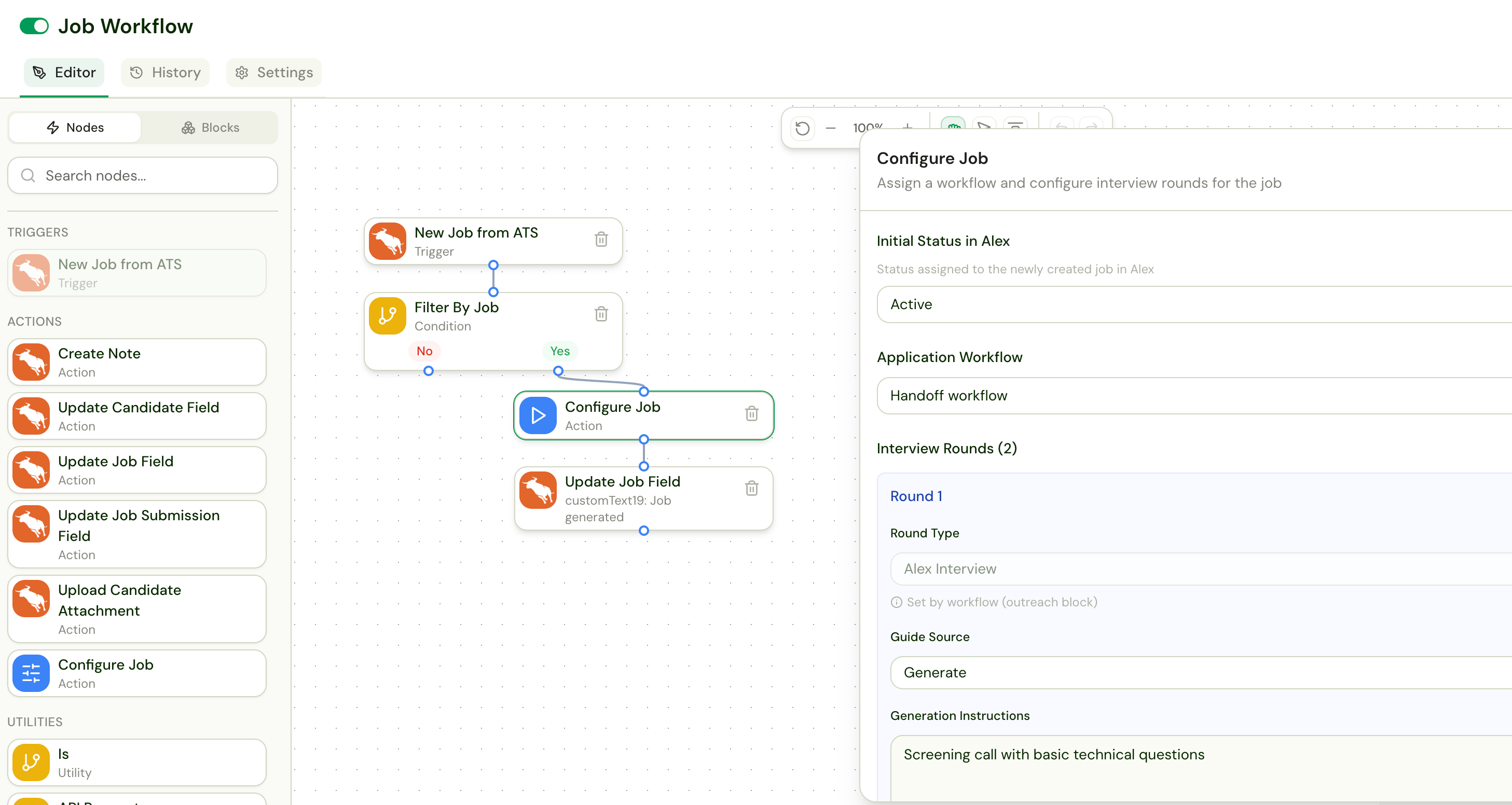
The Configure Job Action
The Configure Job action is unique to job workflows. It defines how Alex sets up each imported job. When you click on it, you can configure:Initial Status in Alex
Set the default status for newly imported jobs (e.g., Active, Paused).Application Workflow
Select which application workflow will be attached to the imported job. This determines how candidates will be managed for this job going forward.Interview Rounds
The number of rounds and their types (AI Interview or Human) are determined by the application workflow you select above. The Configure Job action then lets you define how the interview guides are set up for each AI interview round when the job is created. For each round, you can specify:- Guide Source — how the interview guide is set:
- Generate — auto-generate a guide from the job description
- From Template — use an existing interview guide as a template
- Use Existing Guide — attach a specific existing interview guide
- Generation Instructions — custom instructions for guide generation (e.g., “Screening call with basic technical questions”)
- Question Limit — optionally cap the number of questions
- Round 1: Auto-generated screening guide based on the job description
- Round 2: Technical guide generated from a Python template
- Round 3: Human round (no guide configuration needed — handled by Coordinator)
Job Labels
Labels applied here behave like any other job label — most usefully, Analytics can filter on them. They are applied when the job is imported and again whenever it is reconfigured. There are two ways to apply one: Auto-apply Labels — pick an existing label, or add a new one and choose its colour. Every job this workflow imports gets it. Auto-apply Labels from ATS Data — label each job with the value of a job variable, read live from your ATS. Use this to slice Analytics by something only your ATS knows, such as a region, an area, or an owning team. Pick the job variable to read, and optionally a label prefix. The prefix names the label — a prefix ofRegion: over a value of West labels the job Region: West — which keeps two rules on one job readable. The variable must be a job-scoped variable backed by ATS data; you create those under Settings → Custom Variables, and they can read a plain ATS field or a Workday custom report column.
The prefix also controls replacement. With a prefix, a value that has changed since the last import replaces the label under that prefix instead of adding a second one — so a job that moves regions ends up with one region label, not two. Without a prefix the rule only ever adds labels.Everything under the prefix belongs to the rule. Labels outside it are never touched, but a label you add by hand that happens to start with the same prefix will be replaced on the next import — so pick a prefix you don’t also use manually.
Available Actions
Job workflows have a different set of actions compared to application workflows: Triggers:- New Job from ATS
- Job Updated
- Create Note
- Update Candidate Field
- Update Job Field
- Update Job Submission Field
- Upload Candidate Attachment
- Configure Job
- API Request
- Is
- Filter By Job
Tips
- Use Filter By Job to only import jobs that meet certain criteria — for example, only jobs in a specific department or with a specific status in your ATS.
- The Configure Job action can set up multiple rounds at once, so you can standardize your interview process across all imported jobs.
- If you need custom logic for different types of jobs, use the Is or Filter By Job utilities to branch and apply different configurations.